


Tuesday, December 8, 2009


Monday, November 16, 2009
Discovery Education

Talk about a teachable moment!!!
Pandemic is a terrifying word--but what does it really mean? The recent outbreak of H1N1 is only the latest in a series of deadly global battles between human and virus. And as scientists learn more about the ways viruses mutate and replicate, an international effort is underway to track and vanquish humanity's most lethal foes. The program traces the spread of swine flu from Mexico around the world and draws parallels between this outbreak and the 1918 Spanish flu epidemic that killed millions of people.
Here is a link to the video--you need a discovery education membership to view or download it.
Wednesday, July 29, 2009
Google Voice--Transcribes your messages to text FOR YOU!
 Aha! I have been waiting for months for my Google Voice invitation to arrive and I just got it. Is there nothing Google cannot do?
 Here is how it went:
- I chose my phone number from a list of possibles--they give you the option of choosing the locality of your phone number if available. So, I chose one that has a local area code.
- I listed the numbers of the phones that I wish to ring when someone dials my Google Voice number. In this case, I want my home phone to ring, as well as my cell phone. So my DH doesn't have to dial many numbers just to reach me.
- If I don't pick up, GV plays my recorded voicemail message and records the callers message for me.
- Then it transcribes the message FOR me into a text message, which I then can access from any browser!!!
- I jumped around a did a little jig.
- You can also download a free app where you can get the messages texted to you, but I didn't do that.
Wednesday, June 24, 2009
Free Technology for Teachers: 30+ Alternatives to YouTube
Free Technology for Teachers: 30+ Alternatives to YouTube
As a teacher that has been frequently thwarted by school district internet filters, this post is a gem! These 30 links bring you to web-based video resources that you can use in the classroom*
*web access is not guaranteed--please check your access before you plan to use any of these in your teaching.
Thursday, June 18, 2009
Creating Multiple Choice Tests That Grade Themselves
Yes. You read that right.
Check out the rpollack.net blog archive post that shows you how to make them, step by step.
You need a Google Docs account to do this. Don't have a Google Docs account? View and listen to this screencast for a "how to" on creating a new Google Account.
Thursday, June 11, 2009
Xobni...for those of us who have a love/hate relationship with Outlook
Now you can have all the LOOOOOOOOVE, thanks to an amazing free download called Xobni.
I was smitten today.
I find Outlook cumbersome and annoying but necessary. I also receive TONS of attachments from people as part of my job. Since I don't have the time to save them all to my network drive, my Outlook account has become a de facto filing cabinet.
But my cabinet--until today--was so disorganized it took forever to find anything. I actually was thinking this thought today (no joke), "If I had a secretary, I could be so much more productive."
Exactly 25 minutes after that thought, I actually have one, he's very sexy with graphs and all that, and CAPABLE! His name is Xobni! (say ZOB-nee)
Here's what he can do:
Lightning-Fast Email Search
Search email & people faster than you can type. (REALLY??? I can type really fast)
Stay in Touch
Contact info, profile pictures, company info, job titles. All organized. Automatically.
Discover Connections
Xobni searches the web for information about your contacts. Facebook, LinkedIn, Hoovers information & more, brought into Outlook.
Threaded Conversations
Email how it was meant to be read, with conversations in context.
Find Attachments--this is the one that makes me so happy!
Historical attachments available instantly without searching.
There's a cool little video at the xobni site www.xobni.com
I was smitten today.
I find Outlook cumbersome and annoying but necessary. I also receive TONS of attachments from people as part of my job. Since I don't have the time to save them all to my network drive, my Outlook account has become a de facto filing cabinet.
But my cabinet--until today--was so disorganized it took forever to find anything. I actually was thinking this thought today (no joke), "If I had a secretary, I could be so much more productive."
Exactly 25 minutes after that thought, I actually have one, he's very sexy with graphs and all that, and CAPABLE! His name is Xobni! (say ZOB-nee)
Here's what he can do:
Lightning-Fast Email Search
Search email & people faster than you can type. (REALLY??? I can type really fast)
Stay in Touch
Contact info, profile pictures, company info, job titles. All organized. Automatically.
Discover Connections
Xobni searches the web for information about your contacts. Facebook, LinkedIn, Hoovers information & more, brought into Outlook.
Threaded Conversations
Email how it was meant to be read, with conversations in context.
Find Attachments--this is the one that makes me so happy!
Historical attachments available instantly without searching.
There's a cool little video at the xobni site www.xobni.com
Monday, June 8, 2009
Monday, May 11, 2009
Video Demonstration: Uploading Files to Google Docs
Look! ANOTHER video demonstration for Google Docs! This episode shows how to upload files to Google Docs.
If you have a specific question about Google Docs, please let me know and perhaps I can create a video demonstration specific to your question, if you wish!
If you have a specific question about Google Docs, please let me know and perhaps I can create a video demonstration specific to your question, if you wish!
Video Demonstration: Creating a Google Docs Account
Hey folks!
I finally got around to beginning the creation of my Google Docs podcast. I can't actually call it a podcast yet, though, because as of this moment there is only one episode: Creating a Google Docs Account
I will add more though, and if you email me questions I can add video demos that will specifically address your needs!
I finally got around to beginning the creation of my Google Docs podcast. I can't actually call it a podcast yet, though, because as of this moment there is only one episode: Creating a Google Docs Account
I will add more though, and if you email me questions I can add video demos that will specifically address your needs!
Monday, April 20, 2009
Pollen Park! Perfect for Interactive Whiteboard Use...

Thursday, April 9, 2009
The Connecticut Science Center is Opening--Finally! But not now...later...

The suspense is killing me...
This is the text from an email I got today:
"Get ready for June! – that's when the new Science Center throws its doors wide open. When in June? Premier Members and Season Pass Holders will be the first to hear."
So, they don't really know?
The people at NOVA want your input!
You know, Leonard Nemoy "NOVA". The "awesome science show" and "incredible internet resource" NOVA. Yay NOVA!
First: Are you a Boston-area middle or high school science teacher currently using technology in your classroom? If so, NOVA would like your input to help shape its future resources. The 90-minute focus groups are being held after school hours on April 28 and 29th (middle school teachers) and May 7 and 8 (high school teachers) at WGBH in Boston. Participating teachers will receive a stipend. If interested, contact Karen Hartley at Karen_Hartley@wgbh.org, or 617.300.3864.
First: Are you a Boston-area middle or high school science teacher currently using technology in your classroom? If so, NOVA would like your input to help shape its future resources. The 90-minute focus groups are being held after school hours on April 28 and 29th (middle school teachers) and May 7 and 8 (high school teachers) at WGBH in Boston. Participating teachers will receive a stipend. If interested, contact Karen Hartley at Karen_Hartley@wgbh.org, or 617.300.3864.
Thursday, April 2, 2009
ASSISTment online math tutoring and assessment--the research says it works!
Math teachers! I know this is a science and technology blog, but you MUST MUST MUST check this resource out! It is a site called ASSISTment, which has been developed at Worcester Polytech using grants from the US Dept of Education and the National Science Foundation. Which both mean that it is
FREE!
The ASSISTment system provides students with two types of tutoring assistance--scaffolds and hints--when they answer a math question incorrectly.
This screenshot gives you a little bit of an idea of how it looks (I intentionally answered the question wrong, so that I would get a scaffold question):
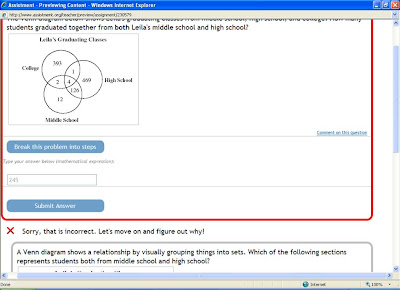
You can log on to assistment.org to create your free account. There is an ASSISTment teacher wiki that has instructions on how it works, but before I found that I clicked around awhile and I figured some of it out that way.
If you are a teacher, you can even apply for FUNDING to create content for your classroom through a WPI program that is funded by the National Science Foundation. So, get some money for the time that you spend putting content on your ASSISTment account and share your data with them to improve the program. For that info, see the homepage.
Okay, so if you want to look at the data from the research, follow this link:
A Comparison of Traditional Homework to Computer-Supported Homework
FREE!
The ASSISTment system provides students with two types of tutoring assistance--scaffolds and hints--when they answer a math question incorrectly.
This screenshot gives you a little bit of an idea of how it looks (I intentionally answered the question wrong, so that I would get a scaffold question):

You can log on to assistment.org to create your free account. There is an ASSISTment teacher wiki that has instructions on how it works, but before I found that I clicked around awhile and I figured some of it out that way.
If you are a teacher, you can even apply for FUNDING to create content for your classroom through a WPI program that is funded by the National Science Foundation. So, get some money for the time that you spend putting content on your ASSISTment account and share your data with them to improve the program. For that info, see the homepage.
Okay, so if you want to look at the data from the research, follow this link:
A Comparison of Traditional Homework to Computer-Supported Homework
Thursday, March 5, 2009
Free podcast hosting with Gcast!

Just this week, I did an interactive whiteboard training session for high school World Language teachers. I did minor in French in college, but since I don't speak Spanish, I needed to beef up the content for this training. So, I invited a particularly spectacular Spanish teacher from a local magnet school to join me. Her name is Melisa and she is extraordinarily inventive in her use of multimedia technologies (including her interactive whiteboard) to make her lessons engaging, authentic and effective.
She introduced me to Gcast. She and her family are native Spanish speakers, but since they are all from different regions of the world, they have different accents (you can't pay for that kind of resource!). In order to take advantage of the opportunity to introduce her students to the spoken word, she uses Gcast to create "answering machine messages" that her students must listen to as a homework assignment. She phones in her podcast (the site says "it's so easy, your grandma can do it" so give it a try) and posts a link to her website. For homework, the students listen to the "message" that she or one of her family members has recorded and fill out a worksheet with several questions related to the message.
The latest example of one of her "messages" is from a make-believe real-estate customer who describes the qualities of a home that she is looking for.
Talk about innovative use! Brava, Melisa!
Sunday, March 1, 2009
5 minute formative assessments for science classes

This is volume one of a three part series by the current president of the NSTA, Page Keeley, and her cohort of educational researchers. It is a fabulous resource for all content areas, K-12. I use these books in a variety of ways; sometimes to begin a content workshop for elementary teachers (so I know where they are, science-wise) or to instigate a discussion on the importance of classroom-based formative assessment with middle level or high school teachers.
Most recently, I used a few probes in a workshop that I did for eight high-school chemistry and physics teachers. We discussed at length the importance of and differences between summative assessments and formative assessments and how each are vital, but serve different essential functions for teachers and students. Summative assessments are assessments OF learning, formative assessments are assessments FOR learning and can be a powerful instructional tool!
Check out the books at NSTA.org. If you are a member, you get a discount. Or, if you buy all three at Amazon.com you can get a discount (and maybe super-saver shipping!).
Having P.E. Twice a Day Would Make Us All Smarter...Really.
Last week, I went to a neuroscience/education conference in San Francisco. Totally blew my mind. I have a degree in neurobiology, but it's been a while since I became acquainted with the current research.
You know, neuroscientists who study how humans learn and educators should really get together on a more permanent basis.
One of my favorite lectures was by Dr. John Medina, author of Brain Rules. The most compelling research that he presented was how exercise effects cognitive function--exercise makes you smarter...truly! Now I want to install treadmills in all classrooms and have gym twice a day instead of twice a week.
Check out his videos (he is highly entertaining) at this youtube channel:
You know, neuroscientists who study how humans learn and educators should really get together on a more permanent basis.
One of my favorite lectures was by Dr. John Medina, author of Brain Rules. The most compelling research that he presented was how exercise effects cognitive function--exercise makes you smarter...truly! Now I want to install treadmills in all classrooms and have gym twice a day instead of twice a week.
Check out his videos (he is highly entertaining) at this youtube channel:
Thursday, February 5, 2009
GoogleDocs continues to Rock My World!
Okay, okay...you've probably heard enough about it from me, but Google Docs continues to be my favorite computerthing ever. Why again?
You know how there's all sorts of cool stuff on the web that you can download to your computer? As an educator and staff developer, I am constantly downloading the latest curriculum standard document, CT State Embedded Task or whatever other .doc, .ppt, .pdf or .xls file that I need to demonstrate, use, copy, project, etc. So I have copies on my laptop, desktop, jump drive, iPod, even paper copies neatly tabbed and organized in a binder on a shelf...top.
When I am on a new computer off site or at home, I always have done things the old fashioned way: first I save the file to the computer that I'm using, and then I upload it to my blog or attach it to an email or whatever. With GD, all you have to do is go to File>Upload>URL and enter the URL of the document.
Voila! File is uploaded to GD with one click. Easiest way to do it is right click on the link to the document, choose 'save location' and then paste it into the Upload URL box. Yay! Several minutes saved.
This is key during a presentation when you quickly want to show a document, but don't want the lag time in your lesson to allow Adobe Acrobat Reader to open the document if it's a pdf (or Word, Excel, Powerpoint, blah blah blah you get the idea).
To Do List: for my next post I challenge myself to use CamStudio to record me doing all of said (above) steps and publish a tutorial video for you visual learners. For the auditory learners in my audience, read this post aloud to yourself.
You know how there's all sorts of cool stuff on the web that you can download to your computer? As an educator and staff developer, I am constantly downloading the latest curriculum standard document, CT State Embedded Task or whatever other .doc, .ppt, .pdf or .xls file that I need to demonstrate, use, copy, project, etc. So I have copies on my laptop, desktop, jump drive, iPod, even paper copies neatly tabbed and organized in a binder on a shelf...top.
When I am on a new computer off site or at home, I always have done things the old fashioned way: first I save the file to the computer that I'm using, and then I upload it to my blog or attach it to an email or whatever. With GD, all you have to do is go to File>Upload>URL and enter the URL of the document.
Voila! File is uploaded to GD with one click. Easiest way to do it is right click on the link to the document, choose 'save location' and then paste it into the Upload URL box. Yay! Several minutes saved.
This is key during a presentation when you quickly want to show a document, but don't want the lag time in your lesson to allow Adobe Acrobat Reader to open the document if it's a pdf (or Word, Excel, Powerpoint, blah blah blah you get the idea).
To Do List: for my next post I challenge myself to use CamStudio to record me doing all of said (above) steps and publish a tutorial video for you visual learners. For the auditory learners in my audience, read this post aloud to yourself.
Monday, February 2, 2009
Edit to CamStudio post
There's an error in my original CamStudio post...see two days ago...in the directions, I said "select the region on your screen you want to record and then press record."
Well, you have to press record (the red circle, dummy!) and THEN select the region of the screen...THEN you press "play" on the youtube (or other video player) window. You'll have a few seconds of lag time on the beginning of the video.
On my desktop computer at work, I actually have to record the audio from a microphone and make sure that everyone around me is superduper quiet. Alternatively, you can narrate parts of the video...like if you're explaining how to download or use CamStudio you can show full-screen recording while you narrate the steps. Very useful for creating training videos or how-to's for your students.
Well, you have to press record (the red circle, dummy!) and THEN select the region of the screen...THEN you press "play" on the youtube (or other video player) window. You'll have a few seconds of lag time on the beginning of the video.
On my desktop computer at work, I actually have to record the audio from a microphone and make sure that everyone around me is superduper quiet. Alternatively, you can narrate parts of the video...like if you're explaining how to download or use CamStudio you can show full-screen recording while you narrate the steps. Very useful for creating training videos or how-to's for your students.
Googledocs in Plain English on TeacherTube!
Still haven't downloaded CamStudio yet, but you want to show your colleagues or students that terrific video produced for Google by common craft, here it is!
Subscribe to:
Posts (Atom)